HighLevel Client Onboarding: 7 Smart Automations
HighLevel Client Onboarding Automations: What to Build Before You Add More SaaS Clients
HighLevel client onboarding starts breaking the moment your sales process gets cleaner than your fulfillment process.
That is the point most GHL agencies miss. They keep trying to close more SaaS clients while the first 72 hours after purchase still depend on memory, Slack reminders, random notes, and someone remembering to send the right form.
That works when you have two clients and too much founder attention. It breaks when you start selling snapshots, SaaS Mode offers, productized setups, or niche GHL systems that need to move from sold to active without five people guessing what comes next.
The fix is not to automate everything. That is how agencies create a faster mess.
The fix is to automate the repeatable handoff: what the client sends, what the team builds, what gets tested, when the client sees first value, and where support boundaries start.
Why HighLevel Client Onboarding Breaks After the First Few Clients
Most agencies can survive messy onboarding while every client still feels custom.
Someone remembers who needs the logo. Someone checks if the calendar is connected. Someone asks for the offer details again. Someone catches the missed setup step before the client notices.
That stops working when the agency starts selling SaaS-style offers.
A SaaS client does not judge onboarding like a normal project client. They are not only asking, “Did the team do the work?” They are asking, “Is this thing real, or did I just buy another platform I have to figure out?”
If the first experience is scattered, the client assumes the backend is scattered too.
That is why HighLevel client onboarding has to do more than send a welcome email. It has to reduce doubt before the client starts second-guessing the purchase.
The Real Goal of HighLevel Client Onboarding
The goal is not to automate every conversation.
The goal is to make the normal path obvious.
For most SaaS Mode agencies, that path has five parts:
intake
internal setup
client expectations
first value
support boundaries
Everything else should be handled carefully. If the client needs custom workflow logic, extra integrations, a deeper offer rewrite, or heavy account review, that should not hide inside a generic onboarding automation.
Your automation should carry the repeatable work. It should not pretend every client is the same.
Start With the Activation Line
Before you build another workflow, define when a new client becomes active.
This is where most HighLevel client onboarding systems fail. They track whether a form was submitted or whether a login was sent, but they do not define the moment the client has actually reached value.
For a GHL SaaS offer, “active” might mean the first missed call text-back is live. It might mean the lead form sends notifications correctly. It might mean the calendar is connected, the pipeline stage updates, and the client has seen the first walkthrough.
The exact moment depends on the offer.
But it needs to be visible. If your team cannot point to the activation line, your onboarding pipeline is only tracking tasks, not progress.
Build 1: The Onboarding Promise
A workflow cannot fix a vague offer.
Before you build the first automation, write the onboarding promise in plain language. This is the line that tells the client what happens after purchase, what your team sets up, what the client must provide, and what counts as extra work.
Weak promise:
We will get your account set up.
That sounds simple, but it creates room for every wrong assumption.
Stronger promise:
We will import your starting build, connect the basic account settings, set up your first pipeline, test lead capture, and send your login walkthrough. Custom workflow edits, third-party integrations, and offer-specific funnel rewrites are handled separately.
That gives your HighLevel client onboarding workflow something solid to support.
This also protects your team. If the client asks for work outside the promise, you are not arguing from memory. You are pointing back to the agreed setup path.
Build 2: Intake and Asset Collection
The first workflow should fire as soon as the client becomes active.
That trigger might be a successful payment, a submitted order form, an opportunity stage change, or a tag such as new-saas-client.
The first automation should do four jobs:
create or update the contact record
move the client into the onboarding pipeline
send the intake form
create the first internal setup task
Do not ask the client to “send over what we need.”
That sentence creates scattered replies, missing files, and follow-up work.
Ask for the exact inputs your team needs to start:
business name
website URL
brand colors
logo
main offer
target customer
phone number
domain access status
calendar link or scheduling preference
users who need access
existing tools that need to connect
current funnels, forms, or automations
The intake form should be boring in the best way. Clean. Direct. Hard to misunderstand.
A good intake flow reduces support before the client ever logs in.
Build 3: The Internal Setup Track
HighLevel client onboarding is not only client-facing.
The internal setup track matters just as much because the client only sees the outcome of whatever your team forgot to do.
Once the intake form is submitted, HighLevel should create a visible setup path for the team. This can live inside a pipeline, a task list, or both.
A simple setup track might look like this:
Create or confirm the sub-account
Import the correct snapshot
Check business profile settings
Add users
Connect or confirm the domain
Confirm phone number setup
Check calendar settings
Review pipeline stages
Test the lead capture form
Test notification flow
Send login and walkthrough email
This is where a lot of agencies need to slow down for one hour so they can save ten later.
If the team has to ask where a client stands, the onboarding system is not giving enough visibility.
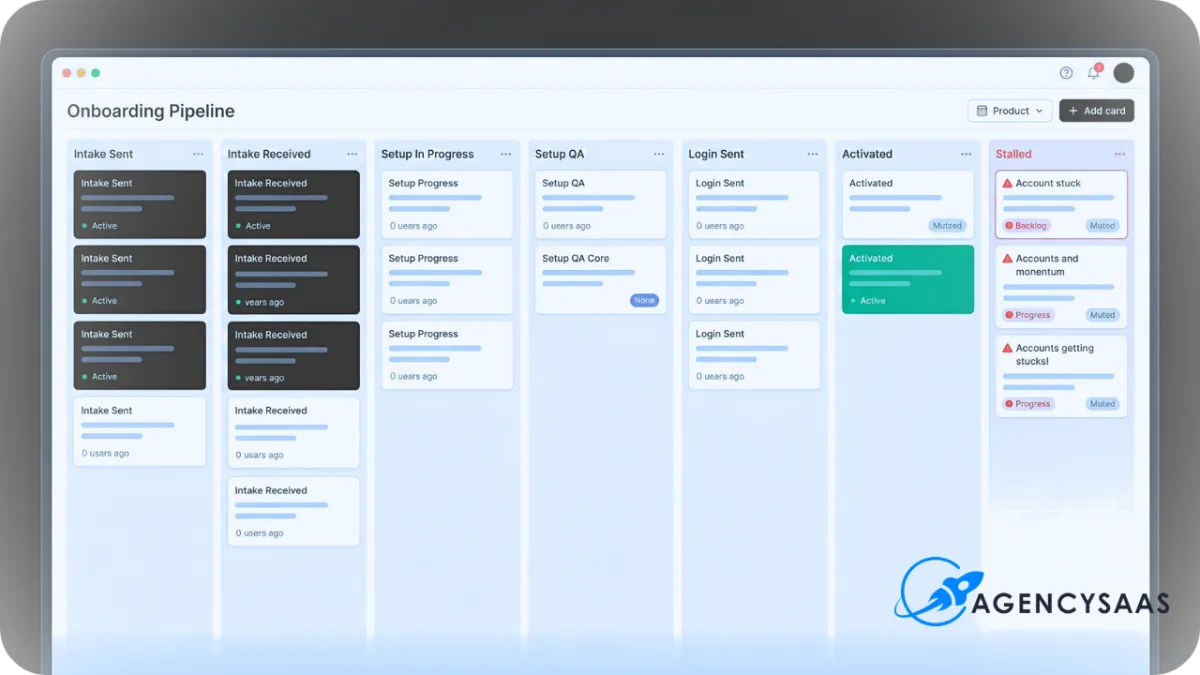
Build 4: The Onboarding Pipeline
Do not hide onboarding inside a pile of tasks.
Use a simple pipeline so the team can see where every new client stands at a glance.
A clean HighLevel client onboarding pipeline can start with these stages:
New Client
Intake Sent
Intake Received
Setup In Progress
Setup QA
Login Sent
Activated
Stalled
The most important stage is usually the one most agencies avoid: Stalled.
A stalled client is not always angry. Sometimes they have not submitted the intake form. Sometimes they missed the login email. Sometimes they never connected the calendar. Sometimes the account is built but the client has not seen the first win.
If your pipeline does not make stalled accounts visible, your team will keep discovering onboarding problems after the client is already frustrated.
Build 5: The Kickoff Email That Sets Expectations
The kickoff email should not sound like a celebration email with no direction.
It should tell the client exactly what happens next.
Use this as your baseline:
Subject: Next step for your HighLevel setup
Hey {{contact.first_name}},
Thanks for getting started.
The next step is to complete the onboarding form below so we have the details needed to set up your account correctly.
Onboarding form:
{{custom_values.onboarding_form_link}}Once that is submitted, our team will review the details, start the setup, and send your login walkthrough once the first version is ready.
Quick note so expectations are clear:
This setup includes the agreed starting structure for your account. Custom workflow changes, third-party tool connections, or funnel rewrites may need a separate review depending on the request.
Thanks,
AgencySaaS
That email does three jobs. It tells the client what to do. It tells them what happens after they do it. It protects the team from custom work being treated like default onboarding.
If your onboarding emails include sender setup, domain-based email, or client-facing nurture steps, pair this flow with HighLevel Email Deliverability: 7 Proven LC Email Fixes for Better Opens. Weak sender setup during onboarding can make a good process look broken.
Build 6: The First-Value Workflow
This is the part most onboarding content skips.
Getting the client logged in is not the same as getting them activated.
The first-value workflow should prove that the system does something the client cares about. For local-service SaaS offers, that first value may be a missed call text-back firing, a lead hitting the pipeline, a form notification reaching the right person, or a review request being ready to send after a job is marked complete.
This is where the Invisible SaaS model matters. The client does not need to understand every tab inside HighLevel. They need to see the system working in the background.
Build your HighLevel client onboarding around that moment.
A simple first-value workflow might do this:
confirm the intake form is submitted
complete the core setup task track
run one test lead through the system
confirm the client receives the notification
send a short Loom showing the live path
move the account to Activated
That is stronger than sending a login and hoping the client explores.
Build 7: The Stalled Client Rescue Flow
Every SaaS onboarding system needs a rescue path.
Not because clients are bad. Because clients are busy.
If the intake form is not submitted after 24 hours, the system should follow up. If it is still missing after 48 hours, it should send a clearer reminder. If the client still has not moved after 72 hours, the workflow should create an internal task for someone to step in.
The same logic applies after login is sent.
If the client never opens the walkthrough, never connects the calendar, or never confirms the first test, the account should not sit quietly in limbo.
A strong stalled-client flow protects retention before churn has a name.
What Not to Automate Too Early
The biggest mistake is thinking every onboarding problem needs another workflow.
Some parts should stay manual until you understand the pattern.
Do not automate custom workflow edits too early. Do not automate complex third-party integrations before your team has a repeatable checklist. Do not automate support decisions that require judgment. Do not pretend every client should receive the same technical setup if your offer has multiple tiers.
This is the same reason snapshot packaging needs hard scope boundaries. If your offer includes a snapshot or productized setup, read 7 Smart HighLevel Snapshot Support Rules to Prevent Scope Creep before you build the onboarding flow around it.
HighLevel client onboarding should reduce repeat confusion. It should not hide custom work inside an automatic path.
The Minimum Build Map Before You Add More SaaS Clients
If your onboarding still depends on memory, build this before adding more clients:
one onboarding promise
one intake form
one onboarding pipeline
one internal setup task track
one kickoff email
one first-value workflow
one stalled-client rescue flow
one support-boundary handoff
That is the base layer.
Once that works, you can add polish. You can add better walkthroughs, better resource pages, better reporting, better client education, better upsell logic, and cleaner plan-specific onboarding.
But do not start there.
Start with the path that turns a paid client into an active client without someone on your team carrying the whole process in their head.
What to Do Next
If you already have SaaS clients, audit the first three days after purchase.
Look for every place where the client waits, guesses, or sends the wrong thing. Then look for every place where your team has to remember the next step manually.
Those are your first automation targets.
If you are about to add more SaaS clients, build the onboarding path before the sales push. A broken onboarding process does not become easier at higher volume. It only fails louder.
Download the free AgencySaaS playbook, then tighten the three parts that decide whether HighLevel client onboarding works:
what the client must send
what your team must build
what proves the client has reached first value
That is how you stop onboarding from becoming a hidden support desk.