

HighLevel Workflow Template: 7 Steps to Package One
How to Turn One HighLevel Workflow Into a Sellable Template
A HighLevel workflow template does not need to be a full snapshot, a giant SaaS build, or a complicated product library.
That is the part most GHL agencies overthink.
They try to package everything at once: funnel, pipeline, workflows, emails, SMS, calendar settings, custom values, tags, forms, dashboards, and onboarding docs. Then the product becomes too big to finish, too hard to support, and too vague for buyers to understand.
A better first template offer is usually smaller.
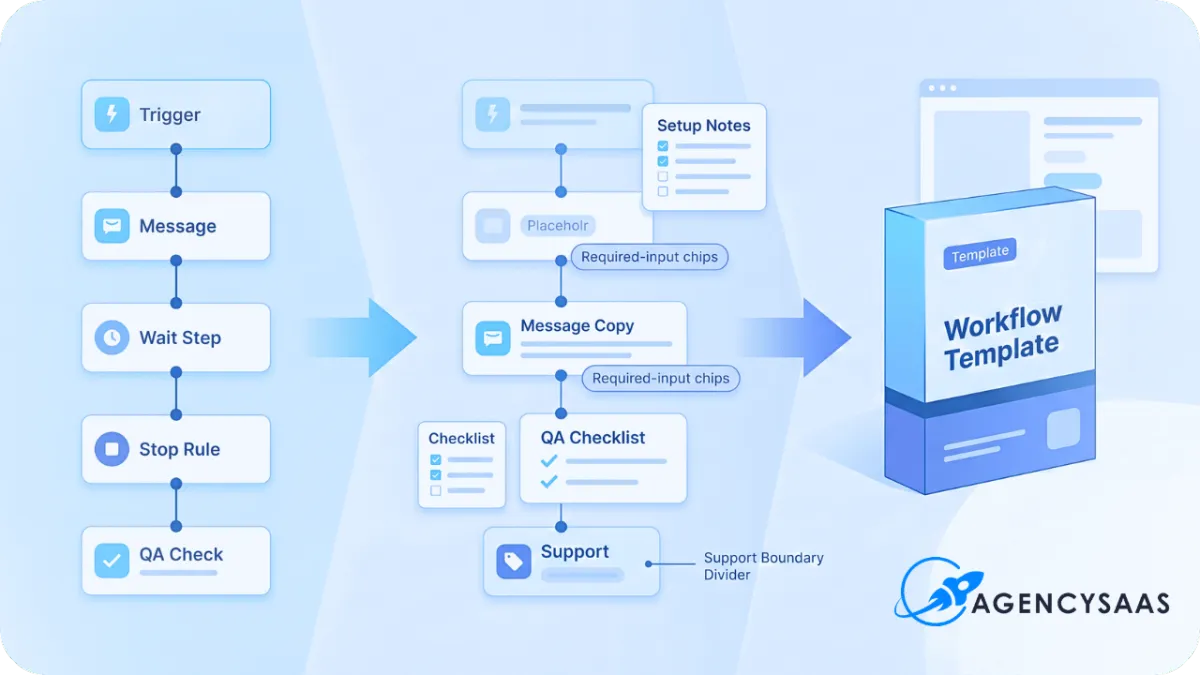
Take one useful workflow. Clean it up. Strip out client-specific assumptions. Add setup notes, sample messages, required fields, QA steps, and support boundaries. Then sell it as a focused template that solves one painful problem.
That is how a workflow turns from internal agency work into a sellable asset.
Why One HighLevel Workflow Template Can Beat a Full Snapshot
A full snapshot sounds more valuable, but it also carries more support weight.
The buyer imports it and immediately has questions. Which workflow should be edited first? Which tags matter? Why is this calendar disconnected? What custom values need replacing? Which pipeline stages are required? What messages are safe to use? What breaks if they change the trigger?
A single HighLevel workflow template creates a cleaner sale because the promise is narrower.
It says: this workflow solves this one problem.
That could be missed call text-back. Lead response. Appointment reminders. No-show recovery. Review requests. Stale lead reactivation. New client onboarding. Failed payment follow-up. Trial user activation.
The buyer does not need to understand an entire SaaS system to see the value.
They only need to understand the problem the workflow fixes.
That smaller promise is useful for agencies that want to start selling assets before they have a full template shop, snapshot marketplace, or productized SaaS library.
The Template Has to Sell an Outcome, Not a Workflow
Nobody wakes up wanting to buy “a workflow.”
They want faster lead response, fewer no-shows, more reviews, better follow-up, cleaner onboarding, or less manual chasing.
That is the first rule.
Do not package the workflow around what it contains. Package it around what it fixes.
Weak offer:
Lead Nurture Workflow Template
Better offer:
New Lead Response Workflow That Follows Up in the First 5 Minutes
The second one is easier to understand because it names the pain.
The buyer can picture the gap.
A HighLevel workflow template becomes easier to sell when it connects to a visible business moment. Missed call. New form submission. Booked appointment. No-show. Review request. Cold lead reply. Client onboarding delay.
If the workflow does not connect to a moment buyers already recognize, it will feel like another automation file they have to decode.
Pick the Right Workflow Before You Package Anything
Not every workflow deserves to become a template.
Some workflows are too custom. Some depend on too many hidden settings. Some only work inside one niche. Some are so basic that buyers would not pay for them. Some require too much support after purchase.
Before turning a workflow into a product, run it through a simple filter.
A sellable workflow should pass five tests:
it solves one clear problem
it can be explained in one sentence
it can work across more than one account
it does not require heavy custom logic to become useful
it has a visible before-and-after result
A missed call text-back workflow passes that filter.
A 47-step custom onboarding workflow tied to one agency’s private fulfillment process probably does not.
That does not mean the complex workflow has no value. It means it may belong inside a service, snapshot, or implementation package instead of being sold as a standalone template.
Start With the Workflow Map
Before you clean up the workflow inside HighLevel, write the workflow map outside the builder.
This keeps the template from becoming a pile of triggers and actions with no sales logic.
A simple workflow map should answer:
what starts the workflow
who the workflow is for
what problem it solves
what messages or actions happen
what conditions change the path
when the workflow stops
what the buyer has to customize
what the buyer must test before turning it on
This is not busywork.
This is the product spine.
HighLevel workflows are built from triggers and actions, and the official workflow docs describe triggers as the events that start a workflow and actions as the steps that happen after the trigger fires. That means your template should make the trigger-action logic easy for the buyer to understand before they touch anything.
For buyers who are still learning the builder, the template should reduce uncertainty. It should not make them stare at the canvas wondering why a wait step exists.
Strip Out Everything That Only Works for One Client
This is where internal agency workflows usually fail as products.
They contain hidden assumptions.
A workflow might include one client’s phone number, one niche’s offer wording, one pipeline name, one custom field, one calendar, one user assignment, one review link, or one tag structure.
That is fine when the workflow lives inside a specific client account.
It is a problem when you sell it as a template.
Before packaging a HighLevel workflow template, remove or replace anything that only works for one business.
Look for:
client names
fixed phone numbers
niche-specific promises
hardcoded URLs
private calendar names
old pipeline stages
user-specific assignments
custom fields that are not explained
tags with unclear names
message copy that assumes one offer
wait steps with no reason
branches that only make sense in one account
Replace those with clear variables.
Use placeholders like:
[Business Name]
[Booking Link]
[Review Link]
[Offer Name]
[Team Member]
[Pipeline Name]
[Calendar Name]
[Reply Keyword]
[Support Email]
The buyer should know what to swap before the workflow goes live.
If they have to reverse-engineer your setup, the product is not done.
Build the Template Around Required Inputs
A workflow template is only useful if the buyer knows what the workflow needs before activation.
That means every template should come with a required-input list.
For a missed call text-back template, the required inputs may include:
business name
phone number
reply message
booking link
notification recipient
stop condition
working hours logic
fallback message
pipeline stage if used
For a review request template, the inputs may include:
review link
customer name field
completed job trigger
delay timing
review message
internal notification
opt-out language
resend rules
For a new lead response template, the inputs may include:
form or survey trigger
lead source
first SMS
first email
assigned user
pipeline stage
wait timing
follow-up limit
booked-call stop rule
This is the difference between selling a workflow and selling a usable workflow template.
The workflow file is not the whole product.
The setup clarity is part of the product.
Package the Messages Like a Template, Not a Finished Campaign
Message copy is usually where the template becomes risky.
If the SMS or email copy is too specific, it will not fit many buyers. If it is too generic, it will feel low value.
The middle ground is to include editable message blocks with notes.
For example:
Hi [First Name], this is [Business Name]. We saw your request come through and wanted to make sure you got a fast reply. You can book a time here: [Booking Link]. Reply STOP to opt out.
That message gives the buyer a usable starting point.
Then add a note:
Replace [Business Name] and [Booking Link]. Keep the first sentence direct. Do not add a discount unless the offer actually supports it. If this is an SMS workflow, confirm the account’s A2P and consent setup before live sending.
That note matters because workflow templates often get used by buyers who understand automation better than compliance.
If the template uses SMS, the handoff should mention A2P, opt-in, and sending readiness. This is where the HighLevel A2P approval walkthrough can sit naturally beside the workflow asset.
A workflow that sends messages is not ready just because the steps are built.
The account still has to be ready to send.
Add QA Steps Before You Sell the Template
A template without QA steps creates support tickets.
The buyer imports it, changes a field, turns it on, and then calls it broken when a trigger does not fire.
Do not let that happen.
Every HighLevel workflow template should include a short testing path.
For a basic lead response workflow, the QA steps might be:
Submit a test lead.
Confirm the contact record is created.
Confirm the correct tag is applied.
Confirm the pipeline stage updates.
Confirm the SMS or email sends.
Confirm the internal notification fires.
Confirm the stop rule works if the lead books.
Confirm the workflow does not duplicate messages.
That checklist does two things.
It helps the buyer get a working result.
It also protects you from vague “it does not work” support requests.
If the buyer skips QA, that is different from the template being broken.
Name that difference in the handoff.
Turn the Workflow Into a Real Product Page
The product page should not read like a feature dump.
It should answer the buyer’s real question: “Will this save me time and can I actually use it?”
A simple workflow template product page should include:
the problem it solves
who it is for
what the workflow does
what is included
what is not included
what the buyer needs before using it
setup time estimate
supported use cases
message templates included
QA checklist included
support window
upgrade option for implementation help
Do not hide exclusions.
If the workflow does not include custom setup, say that.
If SMS compliance is not included, say that.
If niche copy edits are separate, say that.
If import help is limited, say that.
This is the same support-boundary logic AgencySaaS already uses for snapshots. If your workflow template is part of a larger productized setup, read the snapshot support boundaries guide before publishing the page.
The smaller the product, the clearer the boundary needs to be.
Sell It in Layers
A workflow template can be sold in more than one way.
Do not force every buyer into the same package.
A clean offer ladder could look like this:
Template only
The buyer gets the workflow, setup notes, message copy, and QA checklist.
Template plus walkthrough
The buyer gets the workflow plus a short Loom or live setup walkthrough.
Template plus implementation
The buyer gets the workflow installed, configured, and tested inside one account.
That split keeps the low-ticket asset clean.
It also gives buyers a way to pay for help without turning every support question into unpaid setup work.
The mistake is selling “template only” and then acting surprised when buyers ask for implementation.
They will ask.
The offer should already have an answer.
Price the Template Around Support Load
Most agencies price workflow templates too casually.
They look at the asset and ask, “What would someone pay for this?”
That is only half the question.
The better question is: “How much support will this create after purchase?”
A simple email-only workflow with strong docs may be easy to sell at a low price.
A multi-branch SMS workflow with A2P considerations, stop rules, calendars, pipeline changes, and assignment logic may need a higher price or a guided setup tier.
Support load changes pricing.
If the workflow needs more explanation, more customization, or more QA, the pricing should reflect that.
This connects directly to the way agencies package SaaS plans. If you are building templates as part of a broader product library, use the SaaS Pricing Matrix to separate asset pricing, setup work, support limits, and implementation add-ons before you publish.
A workflow template is still a product.
Price it like one.
Use One Workflow to Build the First Template Pack
Once you package one workflow correctly, the next pack becomes easier.
The first template forces you to create the reusable pieces:
naming rules
setup notes
required inputs
message copy format
QA checklist
support scope
product page structure
upgrade path
implementation option
That is the real asset.
The workflow itself may solve one problem, but the packaging system lets you create more.
You can turn that into a small template pack around one niche or one outcome.
For example:
Lead Response Template Pack:
new lead response workflow
missed call text-back workflow
appointment reminder workflow
no-show recovery workflow
review request workflow
Reactivation Template Pack:
cold lead reactivation
no response follow-up
old estimate follow-up
lost opportunity check-in
booked-call revival
Client Onboarding Template Pack:
intake reminder
setup status update
login walkthrough delivery
stalled client rescue
first-value check-in
The first product does not need to be big.
It needs to be built in a way that teaches you how to package the next one.
What the HighLevel Workflow Template Pack Builder Should Include
A good Template Pack Builder should not only ask what workflow you want to sell.
It should force the packaging decisions that make the workflow sellable.
At minimum, it should include:
workflow name
buyer pain point
one-sentence outcome
trigger
required fields
required custom values
tags used
pipeline stages used
messages included
stop conditions
setup notes
QA steps
support scope
excluded work
upgrade option
product-page promise
price and delivery format
That is what keeps the workflow from staying trapped inside your own account.
The goal is to turn internal automation into a repeatable product someone else can buy, install, understand, and test.
What Not to Do
Do not sell a workflow just because it looks complex.
Complexity is not the value.
Do not sell a workflow that depends on five undocumented custom values.
Do not leave old client names inside the copy.
Do not include SMS steps without mentioning consent, A2P, and sending readiness.
Do not promise “plug and play” if the buyer still has to connect calendars, phone numbers, custom values, users, or pipeline stages.
Do not include unlimited support with a low-ticket template.
Do not call the buyer’s account broken when the template handoff was unclear.
The workflow is only as good as the packaging around it.
What to Do Next
Choose one workflow that already creates a visible win.
Not your biggest workflow.
Not your cleverest workflow.
The one that solves a painful moment buyers already understand.
Then turn it into a template by cleaning the logic, replacing client-specific details, documenting required inputs, writing setup notes, adding QA steps, and defining what support is included.
Use the AgencySaaS Assets page to position this kind of asset beside other templates, snapshots, and plug-and-play systems. If you are building the dedicated lead magnet, use the HighLevel Workflow Template Pack Builder as the checklist before the workflow becomes a paid product.
A sellable HighLevel workflow template is not just an automation.
It is a small product with a clear promise, clean setup notes, and boundaries that keep the sale from becoming another custom job.